Part 3 of 33
The home page
This is the first screen you see. It is laid out like the wall of cubbies in a classroom: shelves, each hole holding one place in Cogito, with its real picture. The wall is the same for everybody. What sits above it changes when you sign in: before, it shows what Cogito is; after, it shows what your child should do today. Here are both, from the top down.
1. The bar at the top
A blue bar runs across the top of the page.
- Talk / Chat to Pip — the coral button. Your child taps it and says what they want. See Pip, the talking buddy.
- Courses — every course, on one page.
- Guide opens this guide. For parents opens a page about what Cogito is for and how it teaches.
- Free until December 31 — the yellow badge, on a wider screen. It opens the membership page.
- Sign in — the white button. Sign in, or make an account.
2. The slides
Under the bar, a row of slides shows what there is to do: a lesson, the labs, chess, the cube, Competition Prep, worksheets, Life Skills and more. They move on every six seconds. The arrows at the sides and the dots underneath move them by hand, and the pause button beside the dots stops them for good. They never move while the pointer is over them, or on a device set to reduce motion.
3. Learn by doing
Before you sign in, under the slides is the title, Learn by doing., and a line on what Cogito is. Under it are two buttons. Try a lesson opens the first lesson of Grade 3 math. Explore by grade opens every course.
A brown slip under them says what is free with no sign-in: chapter 1 of every course, the films, Fun & Think, chess and the cube, and a first topic of every lab.
4. The cubby wall
Five shelves, each named for what it holds. Tap any cubby to open that place.
- Learn — Math, Science, Reading and Life Skills, and Every course, by grade.
- Labs — Math Lab, Science Lab and the Science Fair Lab.
- Watch — the Tech explained films, a row of title cards, newest first. Slide the row sideways to see more.
- Think and play — Brain Gym, Chess Academy, Play chess, Cube Academy and Fun & Think.
- For grown-ups — the family page, worksheets, Competition Prep, This week, and Where to start.
5. For parents, and the grades
Before you sign in, under the wall comes For parents: no ads, no points, badges or timers, and children never sign in. Read the guide opens this guide and About Cogito says more. Last are the grades, Pre-K to Grade 12; tapping one opens that grade’s math course.
6. The home page by age
On a large screen, before you sign in, the home page may instead be sorted by age: one floor of a building for each age group, Early elementary (Pre-K to Grade 2), Elementary (Grades 3 to 5) and Middle & above (Grades 6 to 12), each holding the places that suit that age. It is headed Find your child’s stage. Phones, tablets and signed-in families always see the cubby wall.
7. Once you are signed in
Sign in and the home page changes. The menu appears down the left. The blue bar carries a Search lessons box, Talk / Chat to Pip, Learners, Guide and Contact. Under the slides comes your child’s own cubby, then anything meant for you, then the wall.
8. Your child's cubby
First comes one cubby with your child’s name on it, such as Priya’s cubby, or Your cubby before you have added a child. Inside is the one thing to do next. It answers one question, and it never offers two. While it gets the day ready it says Getting today ready… for a moment.
- A lesson left part-way is always the headline: Carry on, with where they stopped. With more than one left part-way, it steps through up to five of them.
- Otherwise, whichever homework is open today, with how long it takes. Underneath are the five slips of the week, so you can see at a glance what is done and what is next. This week explains them.
- Today’s homework done, or the whole week done: a tick and what tomorrow brings. Never one more. With no week running, Today’s five takes its place.
- Nothing started at all: the first lesson of your child’s grade, with Open the lesson, and a line that says Not sure where to start? Find where to start.
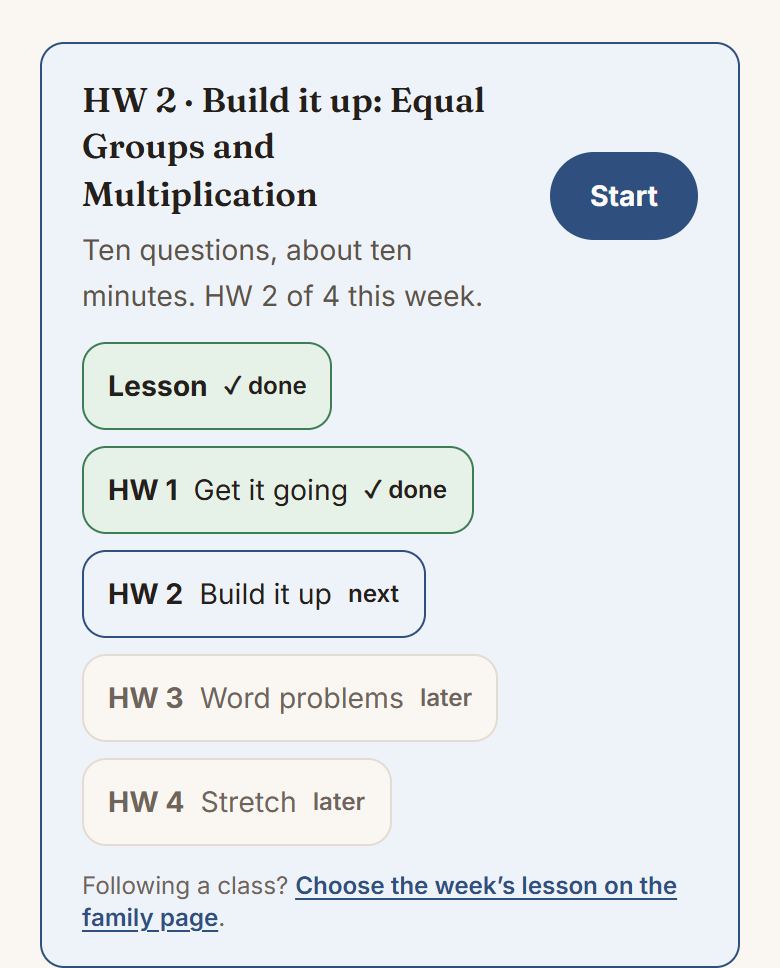
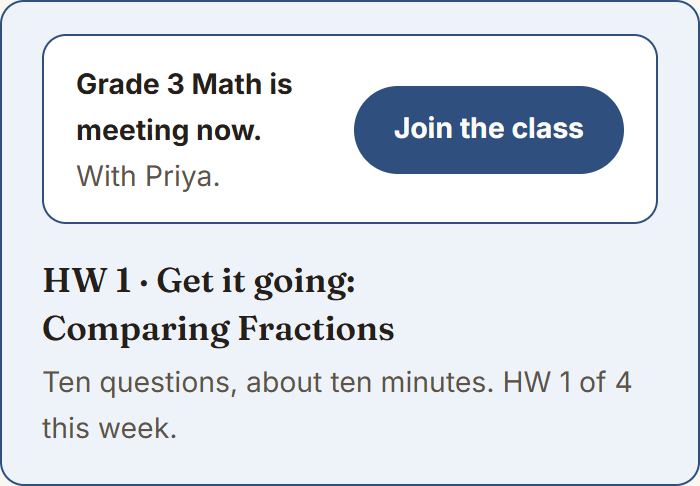
If your child is in a class, the class sits above all of that for the hour it is meeting, with a button that opens it. On every other day it is one quiet line saying when the class next is.
9. Notes for grown-ups
Under the cubby, a small heading, Notes for grown-ups, gathers the things only you need to answer. Each shows only until you have answered it, and once they are all answered the heading goes too.
- Add your child as a learner. Shown until you have added one. Add a learner goes to the learners page, which then offers the test that finds where to start.
- Hints for your child are on. What the helper’s hints are, and where the words go. Keep on or Turn off.
- New here? A short tour of the site, on video, for grown-ups. Watch the tour plays it; No thanks, hide this puts it away. The guide’s contents page can bring it back.
- Outside the United States? Shown once, if your device is set to a country outside the United States. Use levels or Keep grades.
10. Asking Pip
Questions about Cogito itself, and anything to find or learn, go to the coral Talk / Chat to Pip button at the top: say it or type it. Pip, the talking buddy covers it.
What next
The course list is worth a chapter of its own, and that is Finding a lesson.